
Categories: AI Text-to-Speech, AI Translate
Translatium Review: A Great Free Tool (Before Lexibird?)

Okay, let’s talk. If you’re in the SEO or digital marketing game, you know how often you bump into different languages. You’re analyzing SERPs from another country, snooping on a competitor’s foreign-language ad copy, or just trying to decipher an email from a new international client. For years, my go-to has been a patchwork of browser tabs and half-baked solutions. It’s a pain. We’ve all been there.
So, a while back, when I stumbled upon Translatium, it felt like a breath of fresh air. A single, dedicated app that just… worked. On my Mac, on my phone, even right in my browser. And it was free. Not “free-trial” free or “free-but-watch-these-15-ads” free. Just free.
But here’s the twist, and it’s a big one. The folks behind Translatium have just announced it’s heading for retirement. It’s being replaced. So, this isn’t just a review; it’s a bit of an elegy and a preview all rolled into one. Is Translatium still worth your time? Let’s get into it.
So, What Exactly is Translatium?
At its heart, Translatium is a straightforward, no-nonsense translation tool. But it’s the packaging that makes it special. It’s not a website you have to keep open; it’s a dedicated application that lives on your desktop (Windows, macOS, and even Linux—shoutout to the open-source crowd!) and on your phone (iOS & Android). It boasts a staggering 200+ languages, which is frankly more than I can even name.
The core promise was always simple: instant translation without the baggage. No ads, no trackers, no funny business. In an age where every click feels like it’s being monitored and monetized, using a tool that respects your privacy is a pretty big deal. It also comes packed with some genuinely useful extra features that lift it above a simple copy-paste machine.
Visit Translatium
My Favorite Things About Using Translatium
I’ve used a lot of tools over the years, and most of them get uninstalled within a week. Translatium stuck around. Here’s why.
A Tool for Every Device I Own
This is the big one for me. I work on a MacBook Pro, but I use an Android phone. It’s a weird combo, I know. Having an app that seamlessly exists in both ecosystems is fantastic. Add to that the browser extensions for Chrome, Firefox, and Safari, and you have a translation tool that’s literally everywhere you are. No more context switching. You just highlight text, hit a shortcut, and boom—translation. It’s the kind of convenience that, once you have it, you can’t imagine living without.
More Than Just a Word-for-Word Swap
Basic translation is one thing, but understanding nuance is another. Translatium tries to bridge that gap. When you translate a word, it doesn’t just spit out the equivalent. It offers a mini-dictionary with definitions and synonyms. My favorite feature? The voice output. Hearing a word pronounced correctly has saved me from embarrassing myself on calls more times than I can count. It even has a ‘phrasebook’ where you can save common translations you use all the time—super handy for recurring project terms or travel phrases.
The Best Part? It’s Actually, Genuinely Free
I have to come back to this because it’s so rare. The app is free. The updates were free. There are no ads cluttering the interface, and no creepy trackers sending your data off to who-knows-where. It’s an honest-to-goodness piece of freeware, built to be useful. It’s the kind of project you want to support, built on a philosophy of providing value without demanding a pound of flesh in return. A rare bird, indeed.
Where Translatium Stumbles a Bit
Look, no tool is perfect, especially a free one. As much as I’ve enjoyed using Translatium, it has its quirks. You need to go in with your eyes open.
The biggest one is accuracy. While it’s generally solid for common language pairs like English to Spanish or French, the quality can get a little… creative when you venture into less common territory. It’s great for getting the gist of something, but I wouldn’t bet a high-stakes contract on an un-verified Translatium translation. It’s a guide, not a gospel.
It’s also pretty reliant on an internet connection for its main functions. The phrasebook works offline, which is a nice touch, but for any new translation, you need to be online. Not a huge issue for most of us working from an office or home, but something to remember if you’re traveling. Lastly, the developers have never been super public about what translation technology they’re using. It’s a bit of a black box, which for a tech nerd like me, is always a little unsatisfying.
The Big News: Goodbye Translatium, Hello Lexibird
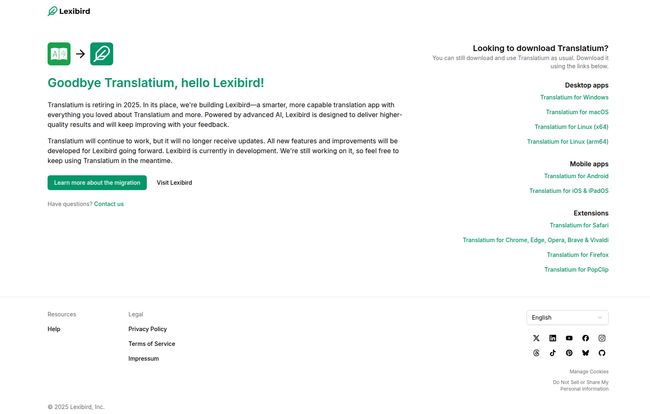
Alright, this is the elephant in the room. According to their official site, Translatium is being retired in 2025. It will continue to function, but it will no longer receive any updates, new features, or improvements.
In its place, they are building Lexibird.
They’re calling it a “smarter, more capable translation app” that’s “powered by advanced AI.” This is the really interesting part. This signals a shift from whatever older translation API they were using to something more modern, likely a Large Language Model (LLM) akin to what powers tools like ChatGPT or Google’s Bard. This could mean a massive leap in quality, contextual understanding, and the ability to handle nuance and slang much more effectively.
So, while it’s sad to see an old favorite go, the prospect of a successor built on cutting-edge tech is genuinely exciting. Lexibird is still in development, but it’s clearly where all the future effort is going.
So, Should You Still Bother with Translatium?
This is the million-dollar question, isn’t it? My answer is a solid… maybe. It depends on who you are.
If you need a powerful, free, no-ads translation tool right now and don’t want to wait for the still-in-development Lexibird, then absolutely. Download Translatium. It works, it’s available on a ton of platforms, and it’s better than having 12 Google Translate tabs open. Think of it as a very capable lame-duck app. It will serve you well for the time being.
However, if you’re looking for a long-term solution that will continue to grow and improve, you should probably just keep your eyes peeled for Lexibird’s official launch. I, for one, will be keeping Translatium on my machine for now, but I’ve already bookmarked the Lexibird page. I’m cautiously optimistic.
Frequently Asked Questions
- Is Translatium really free?
- Yes, 100%. One of its biggest selling points is that it is completely free to use without any advertisements or user trackers.
- What platforms can I use Translatium on?
- It’s incredibly versatile. There are dedicated apps for Windows, macOS, Linux, Android, and iOS/iPadOS. Plus, they offer browser extensions for most major browsers like Chrome, Safari, and Firefox.
- What is happening to Translatium in 2025?
- Translatium is being officially retired in 2025. The app will continue to work after this date, but it will no longer receive any new updates, features, or support from the developers.
- What is Lexibird?
- Lexibird is the new, next-generation translation app from the creators of Translatium. It’s being built with “advanced AI” to provide higher-quality and more context-aware translations. It is the official successor to Translatium.
- Can I still download Translatium?
- Yes. For now, you can still download all versions of the Translatium app and browser extensions from the official website. The download links are readily available on their migration announcement page.
- Does Translatium have any offline features?
- For the most part, you need an internet connection. However, the Phrasebook feature, which lets you save your favorite or most-used translations, does work offline, which can be very useful for travel.
An End of an Era, And a Look to the Future
It always feels a bit weird when a piece of software you rely on gets sunsetted. Translatium carved out a perfect niche for itself: it was the simple, honest, and reliable choice in a sea of complicated or expensive options. It did its job well, respected the user, and asked for nothing in return.
While it’s a shame to see it go, the move to Lexibird makes perfect sense. The world of translation has been completely upended by AI in the last couple of years, and to stay relevant, you have to adapt. I’ll be pouring one out for Translatium, but I’ll be keeping a close and hopeful eye on Lexibird. Here’s to hoping it carries the same user-first spirit into the new age of AI.


