
Categories: AI Copilot, AI Developer Tools, AI Documents Generator
Userdoc Review: AI Requirements for Faster Dev Cycles?

If you’ve been in the software or product world for more than a hot minute, you know the single biggest source of project headaches. It’s not the code, not the deployment, not even the last-minute feature requests from marketing. It’s the requirements. That tangled, chaotic, ever-changing mess of documents, spreadsheets, Slack messages, and half-remembered conversations that’s supposed to be the blueprint for everything.
I’ve seen projects go off the rails because the user stories were vague. I’ve sat in endless meetings trying to decipher what a stakeholder actually meant. And now, we’re throwing AI coding assistants into the mix. These things are literal. They do exactly what you tell them to. So if your instructions are a mess… well, you get the picture. Garbage in, garbage out, on an epic scale.
So when I stumbled upon a tool called Userdoc, which claims to be a “software requirements platform for the age of AI,” my curiosity was definitely piqued. Another tool? Maybe. But maybe, just maybe, it’s a different way of thinking. So I did a deep dive.
So, What Exactly is Userdoc?
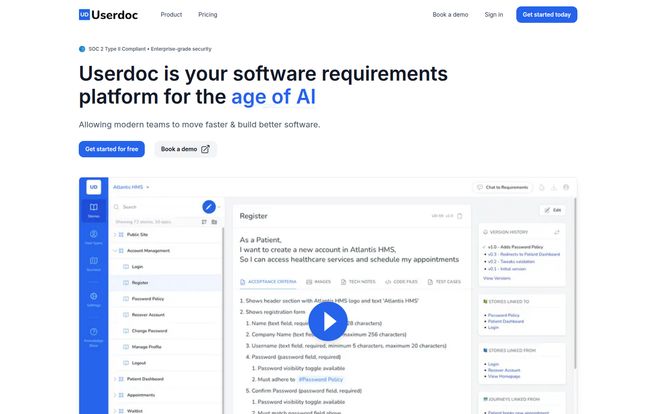
At its core, Userdoc is a modern requirements management tool. But that description feels a little… stale. It’s like calling a Tesla just another car. The secret sauce here is how it weaves AI into the fabric of creating, managing, and understanding software specifications. It’s designed to take that messy, human process of defining a product and give it structure, speed, and clarity. The goal is to help teams build out detailed user stories, personas, user journeys, and technical specs about 70% faster than slogging through it manually. A bold claim, for sure.
Think of it less as a dusty filing cabinet for your documents and more as an interactive workshop where your product managers, developers, and even AI assistants can all get on the same page.
Visit Userdoc
The Big Idea: Software Specs Are the New Code
Userdoc’s website has this killer line: “Software specs are the new code.
And I gotta say, that hits home. For years, we’ve focused on optimizing our code, our pipelines, our infrastructure. But we’ve largely neglected the quality of the instructions we’re feeding into that whole machine.
This is where the game is changing. A well-written user story with crystal-clear acceptance criteria isn’t just a suggestion anymore; it’s a command for your human developers and an essential prompt for your AI coding agents. Userdoc is built around this very principle. It forces a level of detail and organization that prevents ambiguity. It’s all about creating a single source of truth for:
- User stories, epics, and non-functional requirements: The who, what, and why of your features.
- Comprehensive acceptance criteria: Exactly how you know when something is ‘done’. No more guessing games.
- Technical specs & detailed test cases: The nitty-gritty details that engineers need.
- User personas & journeys: Building empathy and context around who you’re building for.
- Full change tracking: A sort of ‘Git for requirements’ so you can see how things have evolved over time.
My Favorite Userdoc Features Walkthrough
Okay, let’s get into the good stuff. I played around with the platform, and a few things really stood out to me as more than just clever marketing.
The AI Scoping Copilot: Your New Brainstorm Buddy
Starting a new project from a blank page is intimidating. The AI Scoping Copilot in Userdoc acts as a fantastic brainstorming partner. You can feed it a high-level idea, and it helps you flesh out potential user stories, features, and requirements. It’s not about letting the AI do all the thinking—far from it. It’s about getting past that initial inertia. It’s a massive accelerator for that first draft, giving you a solid structure to then refine and build upon with your team’s expertise. It’s pretty cool to see it in action.
Breathing Life into Legacy Code
This one is huge. Every company has that one system… the one nobody wants to touch. The original developers are long gone, and the documentation is either non-existent or hopelessly outdated. Userdoc’s ability to unlock specs from existing code is a potential life-saver. It can analyze a codebase and reverse-engineer it into functional specs and documentation. It’s like an archeological tool for your tech stack, helping you map out forgotten knowledge and decipher legacy systems without months of painful manual investigation.
Collaboration That Actually Seems to Work
I’m always skeptical of tools that promise to improve collaboration, but Userdoc has a good approach. Because everything lives in one place—the stories, the tech specs, the acceptance criteria, the user journeys—the context is never lost. A developer can immediately see the user persona a story is for. A QA engineer can see the exact acceptance criteria. There’s less room for misinterpretation when it’s all interconnected. Add in versioning, and you’ve got a clear audit trail of every decision made. That means fewer debates over what was meant and more focus on what was written. One of the testimonials from Sunoco’s Director of IT mentioned this was a “game-changer,” and I can see why.
Let’s Talk Money: Userdoc Pricing
Alright, the all-important question: what’s it gonna cost? Userdoc has a pretty straightforward pricing model, which I appreciate. No hidden fees or confusing credit systems.
| Plan | Price | Best For |
|---|---|---|
| Lite | $19 /seat/month | Small teams or startups (up to 3 seats) working on a single project. Great for getting your feet wet. |
| Pro | $25 /seat/month | Growing teams and established companies. Unlimited projects, integrations, and the AI chat feature make this the sweet spot. |
| Enterprise | Custom | Large organizations needing SSO, dedicated support, SLAs, and custom integrations. |
In my opinion, the value here is pretty clear. The Pro plan at $25 a seat seems like the real deal for any serious team. When you think about the cost of a single developer’s time being wasted for even a few hours due to bad specs, the price pays for itself almost immediately.
The Good, The Not-So-Bad, and The AI-Powered
No tool is perfect, right? After my review, here’s my honest take. The upside is obvious: the AI assistance is a genuine time-saver, the ability to generate docs from code is a killer feature, and the focus on creating a single, collaborative source of truth is exactly what most teams need. The integration with project management tools means it fits into your existing ecosystem rather than trying to replace it.
On the flip side, you can’t just plug it in and expect magic. There’s a bit of a learning curve to get the most out of it, especialy the AI features. You need to learn how to prompt it effectively. And you have to trust the AI’s initial drafts, while still applying that critical human layer of review and refinement. It’s a copilot, not an autopilot. For very small teams or freelancers, the pricing might be a consideration, but then again, the 14-day free trial lets you figure out the ROI for yourself.
Frequently Asked Questions About Userdoc
I’ve gotten a few questions, so let’s clear up some common points.
Can Userdoc replace tools like JIRA or Asana?
Not really, and it’s not meant to. Userdoc is for the ‘before’ part—defining the work with incredible clarity. It then integrates with project management tools like JIRA, where you actually track the tasks and sprints. It makes those tools better by feeding them higher-quality information.
How accurate is the AI in generating requirements?
It’s impressively good at creating a solid first draft. Think of it as a junior analyst who is super fast but needs senior oversight. It will give you a well-structured document that you then need to review, edit, and approve. Its accuracy for generating from code is also dependent on the quality and structure of that code.
Is Userdoc secure enough for our company’s projects?
Yes. They advertise being SOC 2 Type II compliant, which is a big deal. It’s a widely recognized security and privacy standard, meaning they go through rigorous audits to ensure your data is handled safely. For enterprise clients, this is non-negotiable.
Can I import my existing documentation?
Yes, the Enterprise plan specifically mentions data import assistance. For teams looking to migrate from a mess of Confluence pages or Google Docs, this is a key service to get started on the right foot.
What if I have a massive, old, and scary codebase?
That’s honestly one of the best use cases for Userdoc. The feature to generate specs from existing code is designed for exactly that scenario—to bring clarity and understanding to complex or legacy systems.
Final Thoughts: Is Userdoc Worth Your Time?
So, here’s the bottom line. Userdoc isn’t just another documentation tool. It feels like a platform built for the way we build software now. It acknowledges that AI is part of the process and that the quality of our instructions—our specs—is more important than ever.
If your team is constantly bogged down by vague requirements, scope creep, and endless clarification meetings, then yes, Userdoc is absolutely worth a serious look. It represents a shift from simply storing requirements to actively engineering them. And in an industry where speed and accuracy are everything, that might just be the edge you need.


