
Categories: AI Meeting Assistant, AI Note Taker, AI Transcriber
Voicenotes Review: Your Second Brain for Voice Memos?

How many brilliant, world-changing ideas have you had in the shower, on a walk, or while stuck in traffic, only to have them vanish like smoke by the time you find a pen? For me, it’s a depressingly high number. My phone is a graveyard of half-baked voice memos, each one a cryptic message from a past self I no longer understand. “Idea for marketing… the thing… you know…” Useless.
For years, the SEO and content world has been searching for the holy grail: a tool that can effortlessly capture these fleeting thoughts and make them useful. We’ve seen transcription services come and go. Some are okay, some are… less than okay. But recently, a tool called Voicenotes has been making some serious noise in my circles, and I had to see if it lived up to the hype. It calls itself an AI note-taker, but after playing around with it for a while, I think it’s aiming for something much bigger: a true “second brain” that actually listens.
Visit Voicenotes
What is Voicenotes, Really?
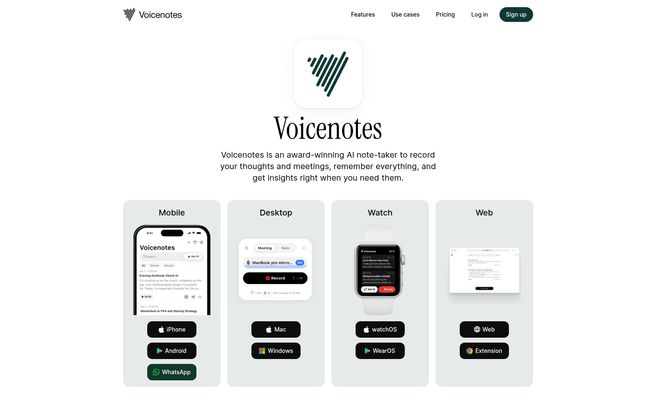
On the surface, Voicenotes does what it says on the tin: it transcribes your voice notes and meetings. Simple enough. But that’s like saying a smartphone is just a device for making calls. The magic is in the execution and the layers built on top. It’s an app for your phone (iPhone and Android), your watch, your desktop (Mac and Windows), and the web. It’s everywhere you are.
You talk, it types. But then, its AI kicks in. It doesn’t just give you a wall of text. It understands it. It organizes it. It lets you query it later. It’s less of a transcriber and more of a personal archivist, one that speaks over 100 languages, which is frankly insane. So that brilliant idea you mumbled in a sleep-deprived haze at 2 AM? Voicenotes might actually remember it better than you do.
The Core Features That Actually Matter
Alright, let’s get into the nitty-gritty. Any tool can have a flashy feature list, but which ones will you actually use? Here’s my breakdown of what makes Voicenotes tick.
Smart Transcription That (Almost) Reads Your Mind
I’ve used my fair share of transcription tools, from Apple’s built-in dictation to Otter.ai. The accuracy of Voicenotes is… impressive. Genuinely. I tested it by mumbling, speaking quickly, and even using some industry-specific jargon (CPC, SERP, you know the drill). It kept up remarkably well. The website claims it’s “significantly more accurate than Apple and Otter,” and while that’s a bold claim, my initial tests have me nodding along. The fact that it handles names and nuances across dozens of languages is a huge plus for international teams.
From Voice Memo to Blog Post with a Click
This is the feature that made my content-creator heart skip a beat. The “Create” function is a game-changer. You can take a rambling 5-minute voice note about a potential article, and ask the AI to turn it into a structured outline, a to-do list, a social media post, or even a draft email. It’s not perfect, it wont write the final piece for you, but it slashes the inertia of starting from a blank page. It turns your raw ideas into workable material. Effortlessly.
The “Ask AI” Feature: Your Personal Archivist
Remember that meeting from three weeks ago? The one where you discussed the Q3 budget but you can’t recall the exact percentage you agreed on for the ad spend? With Voicenotes, you don’t have to scroll through endless notes. You just ask: “What was the Q3 ad spend increase we discussed in the marketing meeting?” The AI scans your archive and pulls the answer. It’s like having a search engine for your own life and work. This is the “second brain” concept in action, and it feels a little bit like magic.
That Killer WhatsApp Integration
I have to admit, this felt like a gimmick at first, but I was wrong. I’m in so many WhatsApp groups where people just drop long, rambling voice notes. Instead of spending 3 minutes listening to my cousin describe his new shed, I can just forward the voice note to the Voicenotes bot. A few moments later, I get a full transcript back. It’s brilliant. A friend sent me her grandmother’s recipe via voice note, and I forwarded it straight to Voicenotes, preserving it forever as searchable text. It’s one of those small quality-of-life features that you quickly can’t live without.
Who is This For? Real-World Use Cases
A tool is only as good as the problems it solves. So who gets the most out of Voicenotes?
- Content Creators & Writers: This is a no-brainer. Capture blog ideas on the go and turn them into outlines instantly. Record interviews and get an instant, searchable transcript.
- Project Managers & Team Leads: Record your meetings (without that creepy bot announcing its presence!) and get instant summaries and action items. Forward voice updates from team members to keep a clean, text-based log of project progress.
- Students: Record lectures and never miss a detail. You can even ask the AI to summarize the key points of a two-hour lecture on quantum physics. Good luck with that, but at least the tool can try!
- Anyone Building a ‘Second Brain’: If you’re into personal knowledge management (PKM), this is a fantastic tool for capturing the “input” phase. It’s a digital butterfly net for every thought that flutters by.
Also Read: YOMO AI Review: A PM's Take on This New Tool
Let’s Talk Turkey: Voicenotes Pricing
Okay, the big question. What’s it going to cost? Voicenotes keeps it refreshingly simple with two main tiers. No confusing add-ons or hidden fees. I’ve laid it out in a simple table.
| Plan | Price | Best For | Key Details |
|---|---|---|---|
| Individual | $12.99/month or $79.99/year | Personal & professional solo use | Unlimited notes and meetings. Works across all your devices. |
| Teams | $49/month (for the whole team) | Startups, agencies, and businesses | Limited launch offer! Unlimited users, no per-seat pricing. Up to 10,000 minutes/month. |
My take? The Individual plan is priced competitively against other premium transcription services, but offers way more with the AI features. The real stunner here is the Teams plan. A flat $49 per month for your entire team is an incredible deal, especially if you’re used to per-user pricing that bleeds your budget dry. The 10,000-minute limit is generous for most small to medium-sized teams.
The Not-So-Perfect Bits (My Honest Take)
No tool is perfect, and it would be dishonest to pretend otherwise. While I’m pretty jazzed about Voicenotes, there are a couple of things to keep in mind. First, the price for the individual plan, while fair for a professional, might be a bit steep for a student or casual user. You have to be committed to using it to justify the cost over free (and less powerful) alternatives.
Second, while the Teams plan is a great deal, that 10,000-minute cap is something to watch if you have a large, meeting-heavy team. They mention add-ons are available, but that’s an extra cost to consider. Finally, the website notes the desktop apps are in ETA. They work, but it suggests they’re still being polished. Not a dealbreaker for me, as the web app is solid, but something to be aware of.
Privacy: Do They Eavesdrop on Your Ideas?
In 2024, you can’t talk about an AI tool without talking about privacy. Are my genius (and sometimes embarrassing) voice notes being used to train some faceless AI model? Voicenotes is very clear on this: No. They state that all your data is encrypted at rest and is never, ever used for AI training. It’s only accessible via your own authenticated request. They’re GDPR compliant and working on SOC 2. For me, this is a massive green flag and a prerequisite for trusting a tool with my thoughts and client meetings.
The Final Verdict: Is Voicenotes Worth It?
So, after all that, what’s the bottom line? Yes, I think Voicenotes is absolutely worth it for the right person. If you’re a professional who lives and dies by meetings, ideas, and content creation, the time and mental energy this tool saves is well worth the subscription. It’s a premium tool with a premium price, but it delivers on its promises.
It’s more than just a transcription service. It’s a well-designed, privacy-focused, and genuinely intelligent system for turning the spoken word into a valuable, searchable asset. It’s one of the closest things I’ve seen to a functional “second brain,” and it’s earned a permanent spot in my digital toolkit. My old, cryptic voice memos can finally rest in peace.
Frequently Asked Questions About Voicenotes
- How accurate is Voicenotes transcription?
- In my experience, it’s highly accurate, even with background noise and fast speech. It also handles industry-specific jargon surprisingly well. It’s definitely in the top tier of transcription services I’ve used.
- Does Voicenotes work for languages other than English?
- Yes! It supports transcription in over 100 languages, making it an excellent tool for international teams or multilingual users.
- Is my data safe with Voicenotes?
- Voicenotes emphasizes privacy. They state that your data is encrypted and is never used to train their AI models. They are GDPR compliant, which is a strong indicator of their commitment to data security.
- Can I use Voicenotes to record my Zoom or Teams meetings?
- Absolutely. It’s designed to record online meetings from major platforms like Zoom, Google Meet, and Microsoft Teams, often without needing to have an extra “bot” participant join the call, which is a much smoother experience.
- What’s the main difference between the Individual and Teams plan?
- The Individual plan is for one person with unlimited usage. The Teams plan is a flat monthly fee for your entire company (unlimited users), but it comes with a shared pool of 10,000 transcription minutes per month.
- Is there a free trial for Voicenotes?
- The website doesn’t explicitly mention a free trial, focusing on its paid plans. It’s best to check their official website for the most current offers, as these things can change.


