
Categories: AI Note Taker, AI Productivity Tools, AI Summarizer, AI Task Management
VoxNote Review: Can AI Really Tame Your Phone Calls?

You know the feeling. You hang up from a 45-minute client call, the one where you hammered out the details for a huge project. Your ear is warm, your throat is a bit scratchy, and your brain feels like a web browser with 57 tabs open. You frantically scribble down what you can remember on a sticky note—send invoice by Thursday, check on the revised wireframes, don’t forget to ask Brenda about her cat’s birthday. Okay, maybe not that last one.
But by the time you’ve waded through a dozen emails, the crucial details of that call start to get… fuzzy. Did they say Tuesday or Thursday? Was the budget approval confirmed or just ‘likely’? This is the daily chaos for so many of us in the trenches—project managers, sales folks, freelancers. It’s a constant battle against our own faulty memory.
For years, the solution was either meticulous, real-time note-taking (which means you’re not fully present in the conversation) or expensive transcription services. But now, AI is stepping into the ring. I’ve been hearing a lot of buzz about tools that promise to be your personal meeting assistant, and a newer name that popped onto my radar is VoxNote. Their promise is simple and bold: to bring AI to your phone calls and turn conversational chaos into clean, actionable notes. So, I had to see for myself. Is this another piece of overhyped tech, or is it the digital personal assistant I’ve been waiting for?
So, What is VoxNote, Really?
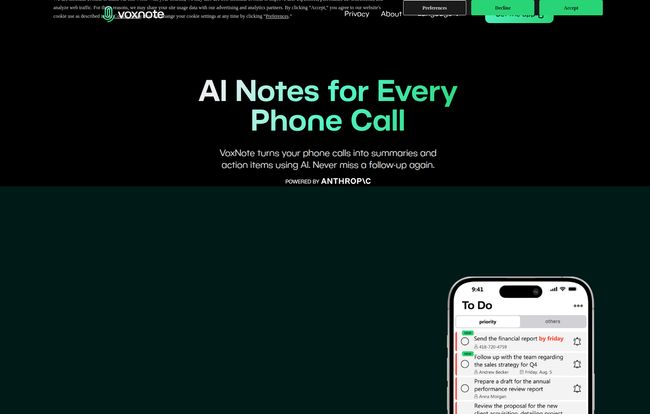
Let’s cut through the marketing jargon. VoxNote is an app for your phone that records, transcribes, and then uses artificial intelligence to summarize your phone conversations. Think of it like having a hyper-efficient secretary shadowing your every call. Except, this secretary doesn’t need a coffee break and lives entirely inside your phone. After a call, it doesn’t just give you a wall of text; it gives you the highlights and, most importantly, pulls out a to-do list of action items.
And it’s not just any AI—they mention being “Powered by ANTHROPIC” right on their homepage. For those in the know, that’s a big deal. Anthropic is the company behind the Claude AI models, which are serious contenders to OpenAI’s GPT series. It signals that there’s some serious horsepower under the hood here.
The whole idea is to let you focus on the conversation, on building rapport, on actually listening, instead of splitting your attention with a notepad. A pretty tempting proposition, I have to admit.
The Features That Genuinely Make a Difference
An app can have a million features, but only a few usually end up changing your workflow. After playing around with VoxNote, here’s what stood out to me as the core, make-or-break functionalities.
AI-Powered Summaries: Your Call’s CliffsNotes
This is the main event. The promise of taking a long, winding call and condensing it into a few, easy-to-digest bullet points. And for the most part, it delivers. The summaries I got were surprisingly coherent. They captured the main topics of discussion and the general sentiment of the call. It’s perfect for a quick refresh before a follow-up call or for pasting into your CRM as a contact note. No more writing “Had a good chat about Q3 strategy” and then immediately forgetting what that strategy was.
Auto-Generated Action Items are the Real Hero
Okay, the summaries are great. But this? This is the feature that made me sit up and go, “Oh, wow.” VoxNote is designed to recognize when a commitment is made on a call. Phrases like, “I’ll get that report to you by Friday,” or “Can you revise the proposal and resend?” are automatically flagged and turned into a checklist. This is, without exaggeration, a game-changer for anyone juggling multiple projects or clients. It’s the safety net that catches the tasks that would normally slip through the cracks on a busy afternoon.
Visit VoxNote
Full Transcripts and Recordings When You Need to Go Deeper
Sometimes, the summary isn’t enough. You need to know the exact wording someone used when they agreed to a specific term. For those moments, having the full recording and word-for-word transcript is invaluable. It’s your backup, your proof, and your source of truth. I see this being huge for anyone in legal, finance, or any field where compliance and record-keeping are critical. It’s like having a verifiable minute-taker for every single conversation.
They also toss in a customizable outbound caller ID, which is a neat, professional touch for those of us who might be using a personal phone for business and want to maintain that polished image.
My Honest-to-Goodness Experience: The Good and The ‘Eh’
So, talk is cheap. How does it feel to actually use it? The setup was straightforward. Download the app, grant some permissions (more on that later), and you’re pretty much ready to go. The interface is clean and minimalist, which I appreciate. There’s no clutter, no confusing menus. It’s built to do a job, and it stays out of your way.
The biggest positive is the reduction in what I call ‘cognitive load’. Not having to actively remember every little thing discussed on a call freed up so much mental space. It’s like clearing your computer’s RAM. You just feel… lighter. And the multi-language support is a massive plus. In our globalized world, being able to get a coherent summary from a call in Spanish or French is not just a gimmick; it’s a necessity for many businesses.
But let’s be real, no tool is perfect. My biggest hesitation is the inherent reliance on the AI’s accuracy. It’s good, impressive even, but it’s not infallible. I’d still give any mission-critical action items a quick cross-reference with the transcript, just to be safe. Think of it as a brilliant but sometimes overeager intern; you trust them, but you still double-check their work before sending it to the CEO.
There’s also the potential to become too dependent on it. What happens if you forget to activate it for a call? Do your note-taking skills completely atrophy? It’s a valid concern. And finally, privacy. You’re giving an app permission to listen to your calls. VoxNote emphasizes security and privacy on their site, which is reassuring. But for some, especially those in highly sensitive industries, this will always be a hurdle. The cookie consent pop-up is a standard affair, but it’s a good reminder to always be conscious of the data you’re sharing.
Who Is VoxNote Built For?
After using it, I have a pretty clear picture of who would get the most out of VoxNote. If you’re one of these, you should probably give it a look:
- Sales Professionals: Juggling leads, remembering follow-ups, and logging call details in a CRM is a full-time job in itself. This could automate a huge chunk of that.
- Project Managers & Consultants: The testimonial from Gabriel Rojo, an engineer, hits the nail on the head. When you’re the hub for multiple spokes, keeping track of who promised what and when is paramount.
- Freelancers & Small Business Owners: You wear all the hats. You’re the CEO, the salesperson, and the customer support rep. Anything that saves you time and prevents you from dropping the ball is worth its weight in gold.
- Journalists & Researchers: For conducting phone interviews, this is a dream. Get a transcript and a summary automatically, allowing you to focus on asking great questions.
Who is it not for? If you barely make phone calls, or your calls are mostly casual chats, this is probably overkill. Also, if you work in an environment with a strict no-third-party-apps policy, you’ll have to sit this one out.
The Million-Dollar Question: What’s the Price?
And here we hit a snag. As of this writing, when I tried to check their pricing, the link on their site led to a 404 “Page not found” error. A bit of a hiccup for a new company, but not unheard of. They’re probably still finalizing their tiers.
If I were to guess, based on similar tools in the market like Otter.ai or Fireflies, I’d expect to see a tiered model. Likely a free plan with a limited number of transcription minutes per month, and then paid tiers (maybe $15-$30/month per user) that offer more minutes, advanced features, and team collaboration. But that’s pure speculation. For now, you’ll have to head to their site and see if the page is back up.
Final Thoughts: Is VoxNote Worth It?
So, the final verdict. Is VoxNote the revolution it claims to be? I’d say it’s a powerful step in the right direction. It takes a genuine, persistent pain point—the mental mess after phone calls—and applies modern AI in a simple, effective way. It’s not magic, and it requires a level of trust in the technology. But the potential time savings and, more importantly, the reduction in mental stress are undeniable.
It feels less like a bulky, all-in-one platform and more like a sharp, specialized tool. A scalpel, not a Swiss Army knife. For the right professional, it won’t just be helpful; it’ll quickly become one of those ‘how did I ever live without this’ tools. If you live on your phone, I’d say it’s absolutly worth a try.
Frequently Asked Questions About VoxNote
- How does VoxNote actually work?
- It’s an app that, with your permission, records your phone calls. After the call, it sends the audio to its AI (powered by Anthropic) which transcribes the conversation, writes a concise summary, and creates a to-do list based on any tasks or follow-ups that were mentioned.
- Is VoxNote secure and private?
- VoxNote states on their website that their platform is secure and protects user privacy. However, like any tool that handles sensitive data, users should review their privacy policy and terms of service to ensure they are comfortable with how their data is managed.
- What languages does VoxNote support?
- One of its key features is multi-language support. While a full list isn’t readily available, this makes it a strong candidate for international teams or individuals who conduct business in languages other than English.
- Does VoxNote work on all phone calls?
- It’s designed to work with your phone calls, but the exact mechanism (whether it works for incoming and outgoing on all carriers and phone models) would depend on the app’s specific technical requirements and permissions on your device.
- How much does VoxNote cost?
- Currently, their pricing page is not active. It’s best to check their official website directly for the most up-to-date information on any free trials or subscription plans they may offer.
- Is this better than just taking notes myself?
- It depends on your goal. If you take perfect notes and never miss a detail, maybe not. But if you want to be more present and engaged in your conversations while still capturing every action item, an AI tool like VoxNote offers a significant advantage. It automates the tedious part, letting you focus on the human connection.
Reference and Sources
- VoxNote Official Website
- Anthropic (The AI technology provider)
- Otter.ai (A well-known competitor in the transcription space)


